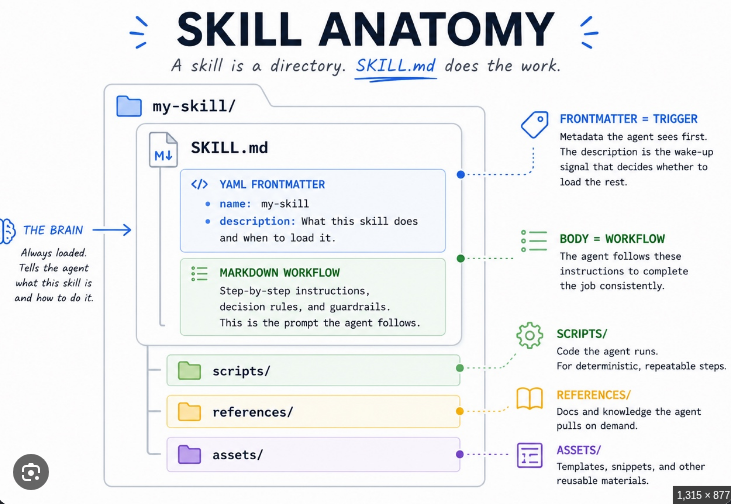
Getting an AI agent to build you a reusable skill is a bit like briefing a contractor. Hand it a vague one-liner and you’re playing whack-a-mole for an entire afternoon — the mount fails, the agent retries, the mount fails again, and it reports each failure in a perfectly polite tone. Hand it the right facts and it does the job in one pass.
I’ve been on both sides of that. This is the second way, written down, with two jobs that actually happened on my own gear: a messaging platform and a NAS mount. Every identifier is a placeholder, so you can share this with anyone.
What a skill actually is
A skill is a note to your future self. It’s a structured file — a SKILL.md — that the agent loads only when the job matches the trigger line at the top. Four parts make it worth keeping: a trigger (when to load it), an ordered procedure (what to do), known pitfalls (what breaks and how to tell), and a success check (how to know it worked).
The lesson I learnt from my own experience is that a skill is only as good as the prompt that made it. A vague prompt gives a vague procedure, and the next time the agent re-derives everything from scratch — it gets it wrong. Every time.
Do the legwork before you type a word
Before prompting anything, collect the ground truth with read-only commands. Don’t let the agent guess your topology, your paths, or your permission boundaries. It’s cheaper to check now than to debug at 2 a.m.
# what the agent user may already do
sudo -l

# current mounts
mount | grep cifs

# mesh connectivity
ip route | grep tailscale

# the test write that tells the truth
sudo -n mkdir <mount-point>/.wtest
That last line is the one that saved me an afternoon. A mount can print rw in every config file and still refuse a single byte. Trust state, not flags.
The rule that matters: the agent checks state itself, and hands you the exact command for anything privileged. If a step needs root or a secret, the prompt should say “hand me this exact command” — not “keep trying sudo”.
The brief, in five parts
Every skill-building prompt should carry five parts, in this order. Think of it as what you’d tell a new hire on their first day:
| Part | What goes in it |
|---|---|
| 1. GOAL | One sentence: the capability to build, plus the trigger |
| 2. ENVIRONMENT | Topology, paths, users, permission model. No secret values — file paths only |
| 3. PROCEDURE | Ordered steps with exact commands, check-then-do |
| 4. PITFALLS | Known failure modes, how to detect each, the success check |
| 5. SECURITY | Where secrets live, what the agent must never do, what only you do |
Quality rules: prefer “check X, then do Y” over a blind “do Y”; name exact paths and exact commands, because ambiguity is the enemy; tell it to write any newly discovered pitfall back into the skill; and close with “Save this as a skill named <name>, trigger: <one line>”.
One more thing about how you write it. The five parts are the checklist, not the format. Write the prompt the way you’d talk to a new hire — plain sentences, in order, with the facts worked in — and all five parts still land.
Case study A — the platform that stopped answering
Goal: the agent can send and receive through a messaging gateway, and can diagnose “the message isn’t arriving” failures.
The facts the brief needs: the gateway lifecycle commands, how channel authorization works, and one provider-side failure mode that trips people up. That last one is worth spelling out, because it looks like a config bug and it isn’t. Some model providers let you opt out of your data being used for free-model training. If that’s set, the provider silently stops serving certain free models — and the symptom shows up as a guardrail or 404 error at reply time. That’s the pain point for cheapskates like me, who only want to use free models or models that come at very low cost. The fix lives on the provider’s account privacy page (e.g. I use OpenRouter), not in your agent config. Toggle the setting, restart the gateway, send a test. Done.
The prompt, written the way a person talks:
“Build me a skill for my messaging platform. When the bot stops answering, work out why. Check whether the gateway is connected, send me a test message, and if nothing arrives, look at who’s allowed to talk to the bot. If the provider throws a guardrail or 404 error, don’t touch my agent config — check and ask if it’s my account privacy settings about my data usage for AI model training. Fix that setting, restart the gateway, send another test. Write down that if a model call fails, the gateway keeps my message, so the conversation picks up where it left off. Never read, print or store the bot API token — it lives in the .env, reference it by path only. Save it as a skill named <platform>-messaging, trigger: use when messages don’t arrive or the gateway misbehaves. Shoot me questions if needed anytime to help expedite or to get clarity.”
Case study B — the mount that reported rw and refused to write
Here’s the part where I went wrong. I started out with my Obsidian vault inside the NAS’s main data dataset — the general storage drive holding all my personal data. The mount reported rw, but the agent couldn’t write. I remounted. I tried sudo. I was, briefly, a person talking politely to a directory.
The answer wasn’t a remount, a flag, or a sudo loop. It was a dataset move, and it was a security decision as much as a functional one: I moved the entire Obsidian folder out of my personal data drive and into its own dataset on the NAS, with full control granted to the agent’s share user.
That move buys two things at once. For me as the owner: the agent can never touch anything on the personal drive — its entire world is one dataset, and nothing else. For the agent: full read/write control over that dataset, which is what an agent editing its own vault actually needs. The permission boundary sits at the storage layer, not in a mount flag.
And that’s the lesson the skill captures, because it cost real time: a client binary hiding in /sbin off the agent’s PATH, no fstab entry meaning no persistence after a reboot, a live mount that verifies immediately but leaves an empty directory after the network-mount race. Fix it in order:
# is it actually mounted?
mount | grep cifs

# the test write — state over flags
sudo -n mkdir <mount-point>/.wtest

# credentials by path, never value
sudo mount -t cifs //<nas-host>/<share> <mount-point> \
  -o credentials=<cred-file>,vers=3.0,iocharset=utf8
The prompt, same brief, written as someone talking:
“Build me a skill for mounting my NAS share <share> at <mount-point> over the mesh. The share is its own dataset on the NAS — I separated it from my personal data drive and gave your share user full control there — so it should be read-write, and I want you to prove that with a test write before trusting any mount flag. I run inside container <id>; the NAS is reachable as <nas-host> on port 445; the credentials live in <cred-file>, which I created myself, mode 0600. You never see the password, so never ask for it or echo it. Walk me through it in order: check the mesh is up with the NAS listed, test port 445, create the mount point, mount with credentials=<cred-file>, vers=3.0, iocharset=utf8, then verify the mount and list the vault. Write for me the fstab entry so it survives a reboot, hand me the exact root command rather than trying sudo yourself — my sudo list only covers mount, umount, mkdir and install. Spell out the potential traps: a read-only-looking share that says rw but refuses writes — test with sudo -n mkdir <mount-point>/.wtest, and if it fails, stop remounting, since the fix is server-side on the NAS, not the mount; the client binary hiding in /sbin off your PATH; no fstab line means no persistence after a reboot, so flag it. Save it as a skill named <share>-mount, trigger: use when the share is unmounted or the mesh is down. Shoot me questions if needed anytime to help expedite or to get clarity.”
Keep your secrets out of the chat
These rules apply to every skill you build, not just the two above.
- Secrets stay out of the conversation. You create the secret files yourself, as root or owner, mode 0600. The agent references file paths, never values. It never asks for, receives, or echoes a password, token, or key in chat.
- Least privilege. Grant the agent sudo for the specific commands it needs. Root-only steps come back to you as exact commands — not escalation attempts. Least privilege is also about scope: the agent’s access should cover its own dataset, not your personal drive.
- Redact before you share. Swap hostnames, network names, IPs, container ids, user names and share names for placeholders, then grep the text for anything that looks like a token.
- Never paste into chat: bot API tokens, SMB or SSH passwords, mesh auth keys, credentials-file contents, sudoers-file contents.
It’s a living document
After the first successful run, test the skill in a fresh session, read it back, and patch in any pitfall you hit along the way. The two case studies above encode exactly the failures I actually ran into — a provider guardrail block, a share that reported rw but refused writes until it got its own dataset, a client binary in /sbin, a missing fstab entry. They’re in the skill because they cost real time. Yours will be different. Write those down too, and if the situation changes — as mine did with the dataset move — rewrite the passage that went stale. Re-evaluate, improve, rewrite.
None of this is magic. It’s a brief, some facts, and a few rules that keep your keys where they belong. Do the legwork, hand over the exact commands, and the skill takes care of the rest. A skill that can’t be edited isn’t really a skill — it’s a fossil.